Production servers
No agents
Expose the attack. Identify the recovery point. Regain control.
CyberSnap opens the snapshots you already keep, examines the files and systems inside, and combines cyber detection with AI analysis. Your team sees what the attack touched and where each system can return from.
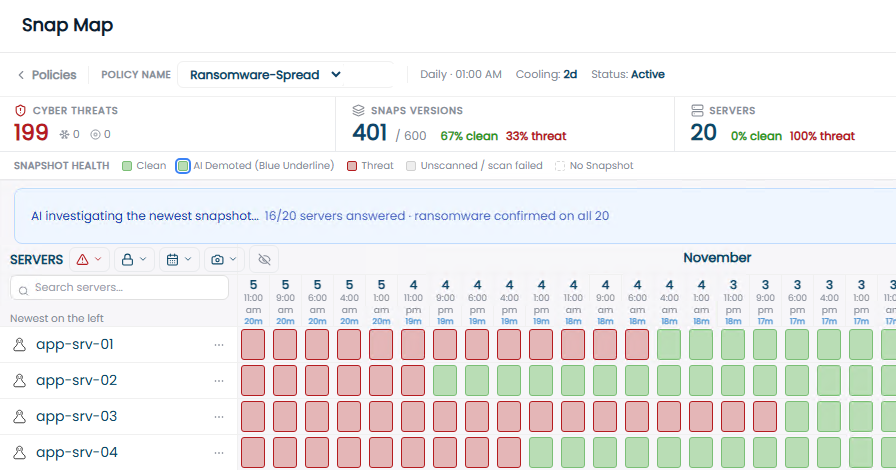
SnapMap, demonstration scenario. Each column is a scanned snapshot, newest on the left. Red: threat findings. Green: no findings detected.
A cyberattack is one of the hardest moments in the life of a company. The defenses have already been breached, and the organization has to decide fast how to get back to work. Even with backups, nobody can say which recovery point is free of the attacker. So recovery takes too long, and decisions are made without evidence.
Source: Sophos, The State of Ransomware 2026. 2,158 organizations in 17 countries.
CyberSnap is the place where your team takes control of the incident while it is happening. It works at the source, where the evidence closest to the attack already sits: the snapshots on your production storage.
Encryption, suspicious extensions, ransom notes, detection-rule matches and abnormal file changes, across every scanned snapshot.
Which servers show findings, which need further investigation, and how far back the indicators go in the inspected history.
A suitable recovery point for each server or folder, as close to the present as the evidence allows.
Most teams pick a restore point by the time the files were encrypted. But the attacker was usually inside before that. Here is what the team sees in CyberSnap instead.
Demonstration scenario.
In a typical deployment, CyberSnap runs on two virtual machines: one connects to the storage through its API, the other to the virtualization management layer. Nothing is installed on the production servers, and inspection works on snapshot copies, never on the running workloads.
Point-in-time copies already kept on your production storage, opened automatically by scan policy.
Ransomware indicators, malicious file patterns and forensic evidence inside the copies.
Compare snapshots from different dates to see when indicators first appear and how they spread.
Choose a suitable recovery point per server or folder and validate selected workloads first.
The first indicator in the inspected history is not necessarily when the intrusion began. Recovery time depends on storage availability, snapshot integrity, containment and validation.
Two business modules and one research layer that keeps both of them current.
Scans the files inside your recovery points for evidence of ransomware and malware, adds forensic findings and AI recommendations, and shows where the attack came from and when it started. The result: a suitable recovery point for each server or folder, chosen on evidence rather than estimates.
Not every attack starts with encryption. Damage Prevention looks across time for each server and across the whole infrastructure, to expose attacks that develop slowly: persistence, espionage and gradual disruption, including patterns that can appear in AI-assisted attacks.
Cross-system correlation, slow-moving attack detection and the AI analysis agents are in development.
Follows new threats, intelligence sources and AI-based attack methods, learns the customer's infrastructure and findings, and turns that knowledge into new detection rules and engine updates, validated before release. The research foundation is in place. Its connection to the customer environment is in development.
Every level adds a different kind of evidence. Together they tell the team which points to reject, where to dig deeper and which point is suitable for further validation.
Broad signs of attack across every snapshot in the policy: thousands of files changed in the same window, ransomware extensions, possible ransom notes, high entropy that may point to encryption, and executables disguised as data files.
Output: an evidence-based first sort of where to look.
YARA-X detection rules from CyberSnap or your own team, indicators of compromise and file fingerprints. A rule keeps matching after a file is renamed, so malware is found even before the visible encryption.
Output: which file, which rule, which recovery point.
Operating-system evidence on Windows and Linux: services, scheduled tasks, auto-start entries, cron and systemd. A file on disk is one finding. A mechanism set to run it again is the reason a restore can bring the attack back.
Output: persistence evidence and a timeline of findings.
Policies scan snapshots automatically, so when a crisis hits the history and the findings are already there.
See which systems were hit, how far back the indicators go and which points show no findings.
Inspect the copy before it returns to production, and start selected servers in isolation where supported.
Connect findings across servers and time to expose persistence and slow-moving activity.
Findings, suspicious files and a timeline to focus the investigation.
Which servers and snapshots show findings, and which show none.
Prioritized recovery points per system before the return to operations.
A documented, evidence-based basis for the decision, during the incident.
A single suspicious file tells only part of the story. CyberSnap's AI engine connects findings across systems and scan history, explains what they mean and recommends where to look next. It never overrides the evidence.
No. Backup and DR stay essential, and CyberSnap works alongside them. They answer whether a copy exists. CyberSnap answers what is inside it, and which point is suitable for each system to return from.
No. There are no scanning agents on production servers. CyberSnap reads the snapshots already kept on your storage, through the storage API and the virtualization management layer.
No. The AI engine receives findings and metadata, such as the detection method, file names and paths, severity and scan history, together with context like the server role. Raw files are inspected by the deterministic cyber engine.
Your team. The cyber engine produces the evidence, the AI explains and recommends, and the people responsible for recovery decide. An AI recommendation never deletes a finding.
That the scan which ran found no indicators in that recovery point. SnapMap shows what was scanned, what was excluded and whether the scan completed, because a partial scan is not the same as a full one. It is a restore candidate, not a promise that no threat exists.
Ransom Recovery focuses on ransomware and malware. Damage Prevention extends the investigation to quiet, slow-moving attacks such as persistence, espionage and gradual disruption. Parts of Damage Prevention are in development.
VMware vSphere, NetApp ONTAP, NAS and CIFS/SMB file shares, AWS EC2, EBS and S3, with Windows and Linux servers. Nutanix AHV is in development and Google Cloud is planned.
With one system that matters to your business. We install, scan the snapshots you already keep, and review the findings with your team: what was found, what needs checking and where to return from.
CyberSnap began as a cyber recovery solution for demanding Israeli government environments. Today it serves government, national institutions and healthcare, and works with MSPs and technology partners. Based in Fort Lauderdale, Florida.