Two business modules and one research layer, built on the snapshots you already keep. Ransom Recovery drives the restore decision. Damage Prevention extends the investigation to earlier discovery of slow-moving attacks. CyberSnap AI Research keeps both of them current.
Ransom Recovery scans the files inside your recovery points for evidence of ransomware, malware and suspicious change. It combines forensic findings with AI recommendations to show where the attack came from, how it unfolded over time, and which recovery point suits each server or folder.
The value is less uncertainty at the moment of recovery, and a return to operations based on evidence. A point with no findings is a restore candidate within the checks that were run. It is not a promise that no threat exists.
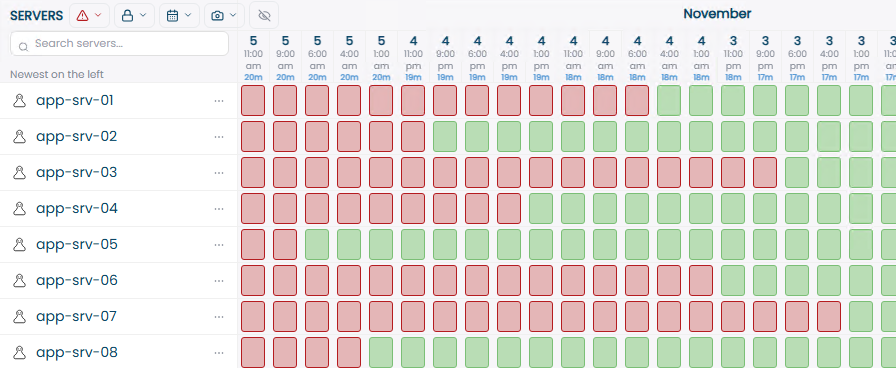
SnapMap, demonstration scenario. Newest snapshot on the left.
Each level answers a different question. Actual coverage depends on version, platform and the type of data available for inspection.
A first picture, fast, and a focus for the rest of the investigation. In incident response, triage is the sorting stage: where are the meaningful signs, which recovery points need attention, where to run a deeper check. While the business is down, the team can start working with findings before the full investigation is done.
Ransomware can rewrite large numbers of files, add extensions or delete originals after creating encrypted copies. Thousands of documents changed in the same window are a possible sign of the Impact stage.
Extensions linked to ransomware families and files that may be ransom notes. A normal instructions file is not necessarily a ransom note, and no note does not rule out an attack. Meaning grows when several signs appear together.
Encrypted content looks highly random. But ZIP files, images and other compressed formats can look similar, so file type and other evidence are taken into account. High entropy alone is not proof.
A file named like harmless data, such as update.dat, whose internal structure matches a Windows or Linux executable. Renaming a file does not change what it is.
Output: an evidence-based first sort that shows the team where to focus and what needs further investigation. A planned mass data migration can also change many files, which is why context matters.
Goes inside file contents with the YARA-X engine and detection rules from CyberSnap or the customer. A rule can combine text strings, byte sequences and logical conditions that characterize the content being hunted.
Rules rely on content, not names, so they keep matching after a file is renamed, and one rule can catch a pattern shared by several malware samples.
Known malicious files or suspicious content characteristics that may show a system was compromised, including signs from before the visible encryption.
A SHA-256 hash identifies identical content precisely, and changes when the content changes. A rule can still match if the patterns remain. They are complementary tools.
Rules and correlations built from field experience help separate a suspicious file, evidence of malicious activity and signs of actual damage.
Output: a finding the team can investigate: which file, which rule and which recovery point. The scan is deterministic, so the same content with the same rules, settings and engine version returns the same result.
Adds operating-system context. The key concept is persistence: mechanisms that let an attacker keep access or re-run malicious code after a login, a restart or another system event.
Windows services, scheduled tasks, auto-start and registry run entries. On Linux, cron jobs and systemd services. Legitimate mechanisms that attackers abuse.
Event logs, service settings, scheduled tasks and other traces that show what was configured or happened. A task set to run a file is not proof that it ran; each finding has its own level of proof.
In which points the signs were found, when they first appear in the inspected history and what changed after. It helps estimate how long suspicious activity was present.
A system-disk snapshot can hold operating-system evidence; a file share holds file content without full server context. A historical disk does not bring back the memory of that moment.
Example: Threat Hunt finds a suspicious file. Forensic adds a scheduled task pointing to it. Earlier points show both existed two days before the encryption. Restoring to the point just before the encryption would have brought back the file and the mechanism that runs it.
SnapMap also shows what was scanned, what was excluded and whether the scan completed. A point with no findings in a partial scan is not the same as a point that passed a full scan. The first indicator in the inspected history is not necessarily when the intrusion began.
Not every attack starts with encryption. Damage Prevention analyzes accumulated scan data over time for each server and across the whole infrastructure, using AI agents and correlation between findings. It is aimed at quiet attacks, espionage, persistence and targeted disruption, including patterns that can appear in AI-assisted attacks. The business value: moving investigation and response to the stage where damage can still be reduced.
Operating-system evidence from Windows and Linux. Live investigation of a server copy in an isolated environment is In development.
Checks whether findings that look separate across servers and points in time belong to one attack that develops slowly.
Agents examine sequences, anomalies and links between evidence, and attach an explanation and a confidence level to each finding. The AI recommends; the deterministic detection engine decides.
AI Damage Prevention is aimed at earlier investigation and damage reduction. It does not claim to guarantee prevention of every attack.
The cyber engine is deterministic. It inspects the data, applies detection rules and indicators, correlates findings by defined logic and produces an assessment of malware and ransomware. Same input, same engine version and rules, same result, so every finding can be explained and re-run.
The AI engine adds context. It receives findings and metadata, not raw files, along with the server role, operating system and infrastructure. It assesses false positives, recommends severity and suggests where to investigate next.
Your team decides. An AI recommendation to lower severity never deletes a finding and never marks a recovery point as free of threats.
Hypothesis-driven investigation, where the AI proposes follow-up checks that the cyber engine validates and runs, is proven in controlled development and is being extended to production in stages.
The AI turns its analysis into a defined investigation proposal. The cyber engine stays in charge of what actually runs.
Identifies missing information and drafts a follow-up check.
Against allowed actions, available capabilities, scope and the approved run budget.
Only what passed the check. New findings come back as evidence.
Strengthened, weakened or narrowed, based on the new evidence.
Proven in controlled development and being extended to production in stages. The asynchronous path lets AI analysis run alongside the scan without making the cyber engine wait for each recommendation.
The choice of recovery point affects two familiar targets: the recovery time objective and the recovery point objective. A point that is too old gives up data that could have been kept. A point that is too recent can bring the attack back.
CyberSnap gives the team the evidence to choose a point and plan the return to work around the findings, the dependencies between systems and the needs of the business.
Days of data given up that the evidence did not require.
As close to the present as the findings allow, per server.
Malware and persistence return to production with the data.
Scans run on a schedule, so when a crisis hits the history and the findings are already there.
Define scan targets, scope and timing in managed policies: hourly, daily, weekly or monthly, manual or in sync with new snapshots. Less dependence on manual runs.
Choose a quick path or a full one, depending on need and supported capabilities. The coverage of each run is part of how its result is read.
Findings are grouped by severity to set priorities. Exclusions handle known items, with visibility into how each exclusion affects results.
Scan results, findings, recovery score and AI threat analysis for the people who investigate and the people who decide.
Policies, assets and results in one console. The API brings supported actions and data into your own workflows.
Two virtual machines beside your storage and virtualization layer. A trial on one system is the usual way to start.
A check mark shows which module a capability belongs to. Status shows its maturity. Actual availability depends on version, platform, scan coverage and how the capability is enabled in your environment.
Start copies of selected servers from a chosen snapshot in an isolated environment, for checks and investigation before they return to production. A single VM, a single snapshot or several VMs together, with revert and cleanup when the check is done.
An extension in development combines evidence from the live run with the scan and history findings, only after isolation is verified.
CyberSnap AI Research serves both modules. It is not a third module. It combines threat research, learning of the customer environment and quality control, so detection improves continuously without waiting for a new product release.
New threats and attacks, intelligence sources and trends, attack methods that use AI, and new AI tools and detection models worth adopting.
The customer's business and key assets, infrastructure and dependencies, specific risks, and patterns seen in the customer's own scan findings, linked to global intelligence.
New YARA-X rules, deterministic engine updates, a dynamic statistical model, tuning of the decision engine, and better AI models and agents.
Every update is validated before release, rolled out in stages and can be rolled back. Updates that need customer approval can be reviewed, approved or deferred.
Status: the research management, content distribution and change-control foundation is in place. Its connection to the customer environment is in development. The areas above describe the intended scope of the system.
In a typical deployment, one virtual machine connects to the storage through its API and a second connects to the virtualization management layer. Nothing is installed on the production servers being inspected.
File shares and objects do not always provide the evidence of a full system disk. Sandbox restore and run depend on the target type and the supported integration.
We install on one system that matters to your business, scan the snapshots you already keep and review the findings with your team.